
BBI Cookie Privacy Control for WordPress
Stop guessing at compliance. Finally, a fully accessible, WCAG-ready cookie consent plugin built for modern WordPress sites.
Secure your user data, ace your privacy audits, and deliver an inclusive digital experience without sacrificing page speed.
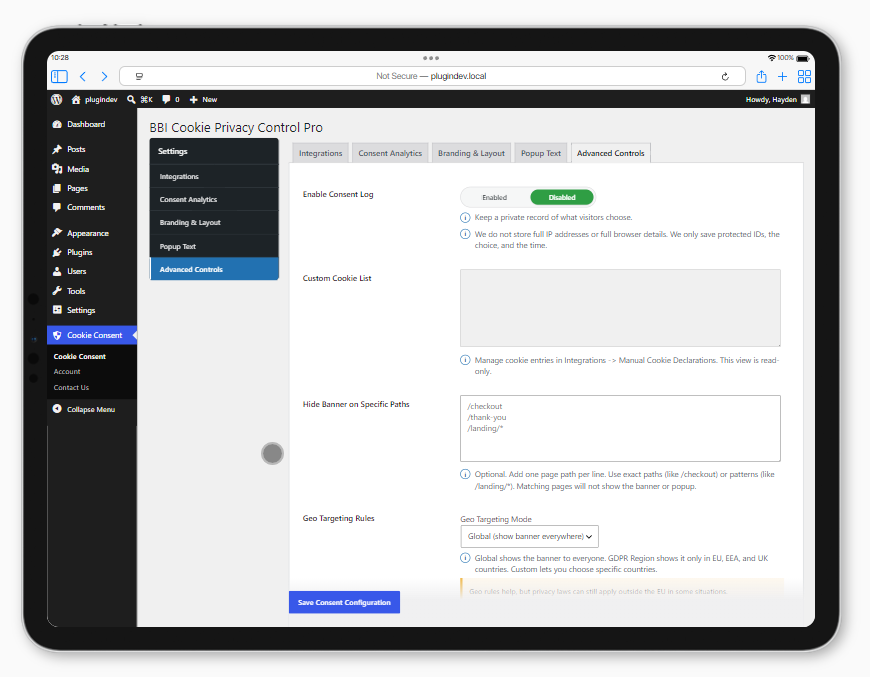
Prepare your website for cookie consent
Clear the compliance hurdles without breaking your user experience.
Most cookie plugins treat accessibility as an afterthought, forcing you to choose between legal compliance and inclusive design. BBI bridges that gap completely. Built with accessibility at its very core, it strips the complexity out of strict European privacy mandates while maintaining an uncompromisingly inclusive user experience.
-
Zero-Leak Local Data Storage: Keeps user consent data locked strictly within your own infrastructure. No third-party data tracking, aligning seamlessly with the absolute strictest EU privacy mandates.
-
Built for WCAG 2.2 Standards: Designed from day one to pass strict global accessibility audits. Ensure your consent banners are fully keyboard-navigable and completely screen-reader friendly without breaking your semantic HTML structure.
-
Google Consent Mode v2 Armed: Effortlessly signal user consent preferences straight to Google services. Protect your tracking data, preserve your ad analytics accuracy, and maintain full compliance in the EU market automatically.
-
Pixel-Perfect, Accessible Styling: Tailor the layout, colors, and typography to seamlessly blend with your brand identity—without accidentally destroying your color contrast ratios or UX architecture.
-
Bloat-Free, SEO-Friendly Code: Engineered to be ultra-lightweight and natively indexable. Keep your core web vitals fast and your search rankings sharp while meeting every legal requirement.
-
Set It and Forget It Configuration: Skip the technical headache. A streamlined dashboard lets you deploy an airtight, geographically targeted consent banner in minutes, not hours.
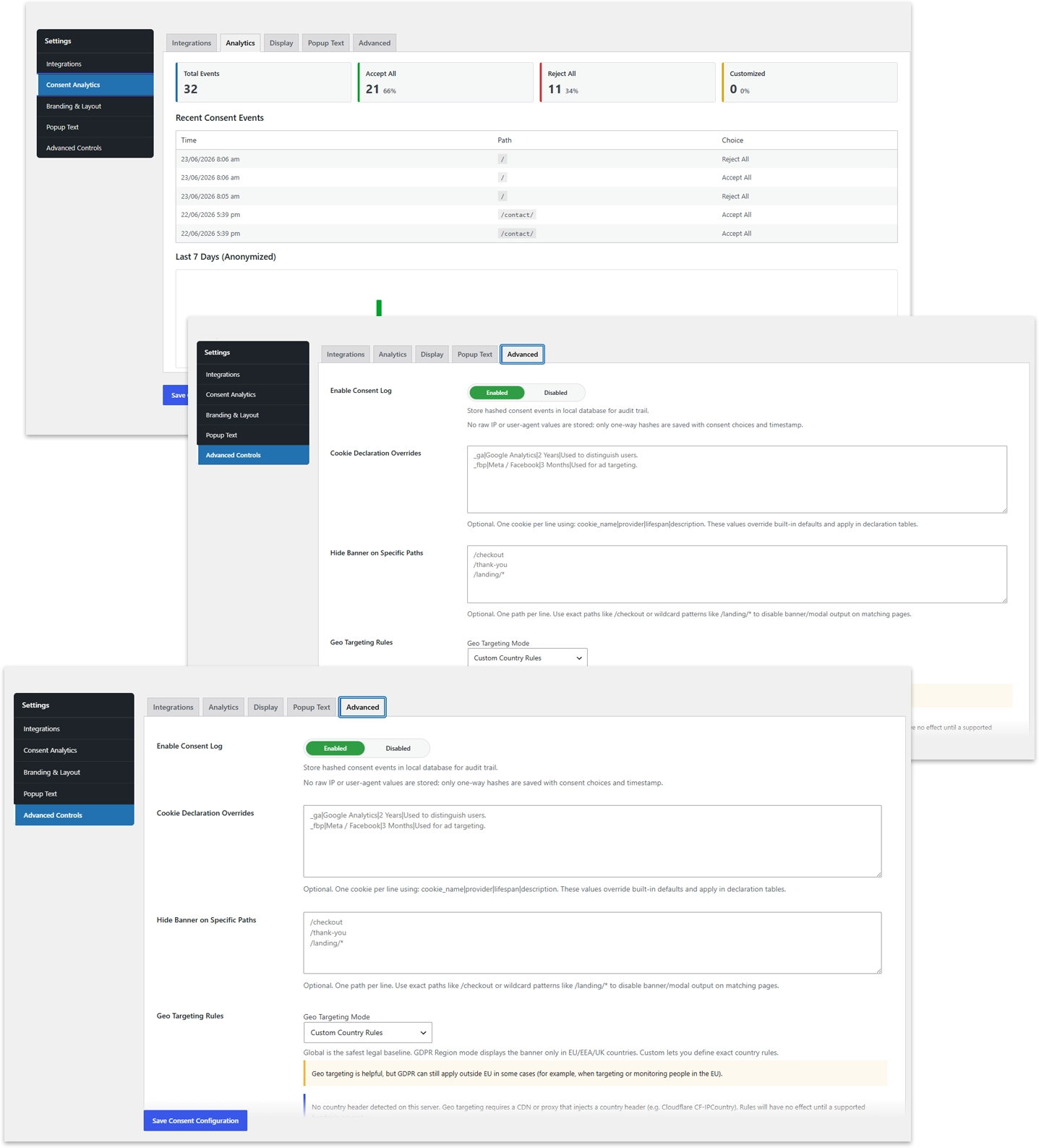
Prepare your website for cookie consent
Clear the compliance hurdles without breaking your user experience.
Most cookie plugins treat accessibility as an afterthought, forcing you to choose between legal compliance and inclusive design. BBI bridges that gap completely. Built with accessibility at its very core, it strips the complexity out of strict European privacy mandates while maintaining an uncompromisingly inclusive user experience.
-
Zero-Leak Local Data Storage: Keeps user consent data locked strictly within your own infrastructure. No third-party data tracking, aligning seamlessly with the absolute strictest EU privacy mandates.
-
Built for WCAG 2.2 Standards: Designed from day one to pass strict global accessibility audits. Ensure your consent banners are fully keyboard-navigable and completely screen-reader friendly without breaking your semantic HTML structure.
-
Google Consent Mode v2 Armed: Effortlessly signal user consent preferences straight to Google services. Protect your tracking data, preserve your ad analytics accuracy, and maintain full compliance in the EU market automatically.
-
Pixel-Perfect, Accessible Styling: Tailor the layout, colors, and typography to seamlessly blend with your brand identity—without accidentally destroying your color contrast ratios or UX architecture.
-
Bloat-Free, SEO-Friendly Code: Engineered to be ultra-lightweight and natively indexable. Keep your core web vitals fast and your search rankings sharp while meeting every legal requirement.
-
Set It and Forget It Configuration: Skip the technical headache. A streamlined dashboard lets you deploy an airtight, geographically targeted consent banner in minutes, not hours.
Privacy Architecture
Airtight data security. Zero third-party middle-men.
100% Self-Hosted Local Storage: Your users’ privacy data stays exactly where it belongs—on your own secure server. We never collect, track, or intercept a single byte of your traffic. You retain complete, unmonitored ownership of your data infrastructure.
Frictionless, On-Demand User Control: Empower your visitors with the immediate, hassle-free ability to customize their cookie choices or instantly revoke consent at any time. No digging through complex menus—just clean, compliant, and accessible user control.
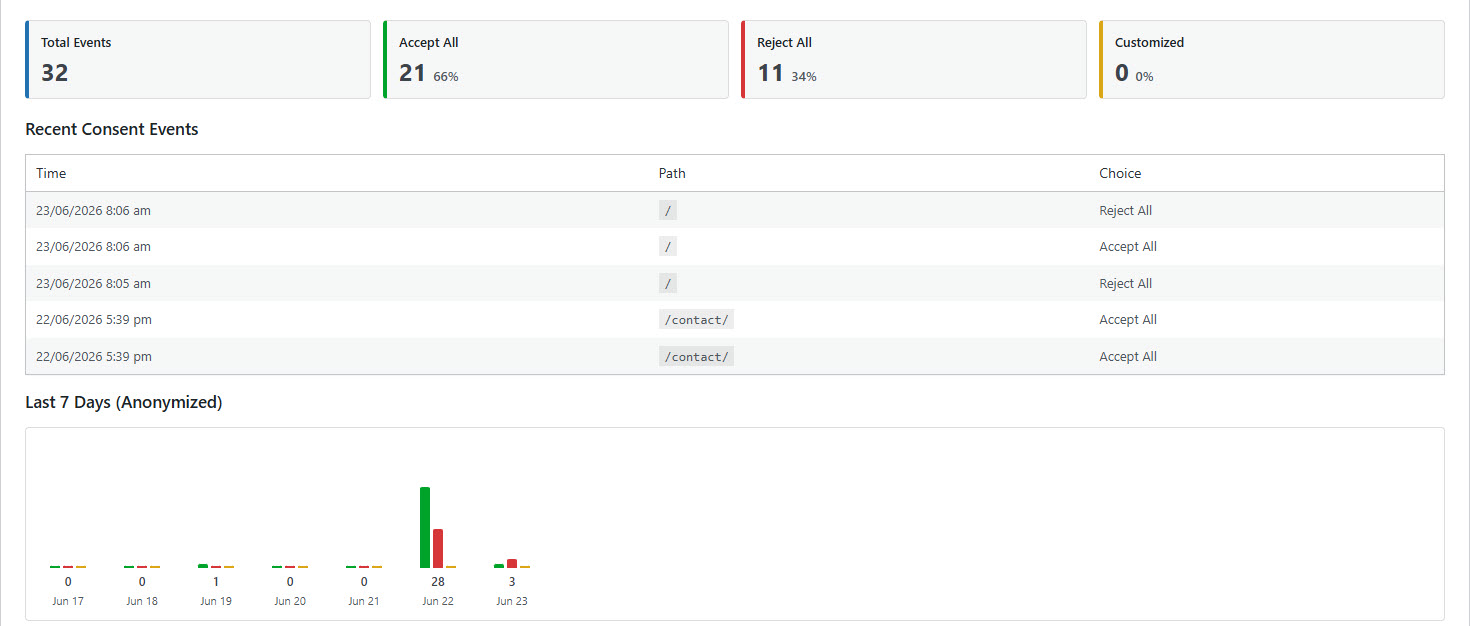
Audit-Ready Consent Logging: Generate ironclad proof of compliance on demand. Our secure, anonymized logging system tracks real-time consent events directly within your WordPress dashboard, giving you the precise analytical backing you need to pass strict regulatory audits.
Consent Engineering
Dynamic control over scripts, policies, and conversions.
Intelligent iFrame Blocking: Automatically trap and restrict invasive third-party content (such as YouTube embeds or Google Maps) from firing a single pixel until visitors explicitly opt in. Keep your initial page load completely clean and legally compliant by default.
Triggered Consent Renewal: Force a strategic preference refresh across your user base whenever you update your core privacy or cookie policies. Never worry about legacy visitors browsing under outdated legal terms.
Conversion-First Banner Hiding: Protect your sales funnels and user onboarding flows. Effortlessly suppress the cookie banner on critical high-intent URLs—like your WooCommerce checkout, custom marketing landing pages, or login portals—to maximize completions.
Frequently asked questions
You have questions relating to this product, of course you do! Use the form below to get in touch and we will answer as soon as possible.
Is it one-off charge or a lifetime licence?
It is a one-time payment that comes with a full year of product updates. To keep receiving updates after your first year, you can choose to renew your license.
What is the duration of my license? Your license remains active for exactly 12 months from your purchase date. For instance, buying a license on October 10 means you will get seamless plugin updates until October 9 of the following year.
Can I upgrade my licence?
Absolutely. You can scale up your license whenever you need to. Simply access your customer dashboard, locate your active license, and click the “Upgrade” link to move to a higher tier.
What is your refund policy?
We want you to try our plugin completely risk-free! That’s why we back your purchase with a 14-day money-back guarantee.
If the plugin doesn’t meet your needs or work perfectly for your setup, just let us know within the first two weeks, and we will issue a full refund—no questions asked, no hard feelings.
How do I setup the A11Y Cookie Manager
You can setup the plugin in the WordPress CMS main menu (on the left-hand side) -> Cookie Consent
Why can't I see my added scripts in the page source?
Because our plugin injects scripts dynamically using JavaScript, they won’t appear in your browser’s traditional “View Page Source” window.
To verify that your scripts are loading correctly, right-click anywhere on your page, select Inspect (or press
F12), and look at the Elements or Console tabs in your browser’s Developer Tools.Should I remove the original scripts from my site after adding them to the plugin?
Yes, absolutely. Once you have copied your scripts into our plugin settings, you must delete the original code from your website to prevent scripts from loading twice.
Important Note for SEO Plugins: If you previously inserted headers/footers or tracking codes through an SEO plugin (like Rank Math, Yoast, or All in One SEO), make sure to clear those code boxes out as well. Moving everything exclusively to our plugin ensures clean code, faster loading times, and zero duplicate tracking data.
Will this plugin automatically block every cookie on my website?
No, it only blocks the cookies attached to the specific scripts you have configured inside the plugin settings. To achieve complete cookie blocking across your entire site, you will need to add all scripts that drop cookies into our plugin dashboard so it can manage them.
What information is captured in the Consent Log, and where does it go?
All data is kept strictly inside your local WordPress database. Because we prioritise user privacy, our logging is 100% anonymised and doesn’t harvest sensitive tracking data like IP addresses.
The log only records the vital, non-identifiable statistics needed for your analytics: the timestamp of the event, the page path, and the specific consent choice made by the visitor.
Where can I find the documentation for this plugin?
The documentation can be found here